How do we protect backups from ransomware?
To protect backups from ransomware, assume attackers will target your backup systems and recovery documentation, not just your production data. The minimum baseline is (1) backup infrastructure and credentials isolated from everyday admin access, (2) monitoring and alerting on backup changes and failures, and (3) routine restore testing with documented evidence. Without a reliable data recovery strategy, ransomware can halt business operations indefinitely.
The 5-Point Backup Protection Baseline
- Separate backup admin access from domain admin and standard IT accounts.³
- Enforce MFA, least privilege, and change control for destructive actions.³
- Enable delete protection and alerting for retention, policy, and repository changes.¹³
- Monitor backup health continuously, not just “success” emails.⁵⁶
- Run scheduled restore tests and keep evidence.¹²⁵⁶
What “protected backups” actually means
Protected backups are not “backups that exist.” Protected backups are backups that are:
- Unreachable to ransomware (isolated access and credentials)³
- Provably restorable (tested)¹²⁵⁶
Ransomware operators routinely attempt to delete or encrypt backup repositories to make paying the ransom feel like the only viable option.¹² Your backup process must account for this reality from the start.
How attackers go after backups?
Most law firms get compromised through credentials and then lose the recovery fight because the attacker reaches the backup environment.³
Common patterns:
- Credential theft and privilege escalation: attackers become a domain admin or gain equivalent cloud admin rights.³
- Lateral movement: they pivot to backup servers, backup consoles, data storage targets, and snapshots.¹³
- Backup destruction: they delete backup jobs, wipe repositories, disable agents, remove snapshots, or change retention policies.¹²³
- Double extortion: even if you can restore, they threaten disclosure of stolen data.¹²
The practical takeaway is straightforward: if your backup environment is administered the same way as your everyday IT environment, an attacker who compromises IT can likely compromise backups.³
How do we protect backups from ransomware?
Use this section as an internal audit, and as the checklist you hold your IT provider accountable to. Whether you manage backups in-house or rely on an external backup service, these principles apply.
Isolate backup infrastructure from everyday admin reach
Minimum baseline
- Backup servers, repositories, and management consoles are on restricted networks.³
- Administrative access is limited to a controlled path.³
Best practice
- Use a hardened admin access pattern (for example, a dedicated jump host with MFA and tight access rules).³
- Restrict inbound management to known sources and eliminate direct admin access from user networks.³
How to validate
- Request a network diagram showing where backup components live and which networks can reach them.⁵
Confirm there is no direct management path from standard user networks to backup consoles.⁵
Separate backup credentials from domain admin credentials
Minimum baseline
- Dedicated backup admin accounts that are not used for general IT administration.³
- MFA enforced on backup administration.³
Best practice
- No standing privileges: use time-limited elevation or just-in-time access where possible.³
- Restrict backup service accounts: no interactive logins, tight permissions, and documented credential rotation.³
How to validate
- List the backup admin accounts, their MFA status, and their privileges.⁵
- Verify backup admin accounts are not members of broad domain admin groups and are not used for email or daily administration.⁵
Microsoft notes that attackers may target backups and key documentation required for recovery, which is why isolated access and hardened procedures matter.³
Add delete protection and governance for destructive actions
Minimum baseline
- Retention policies cannot be changed casually.¹³
- Backup deletion requires explicit permission and is logged.⁵
Best practice
- Dual control for destructive actions (two-person approval) where supported.⁵
- Alerts on changes to retention, backup jobs, and repository configuration.⁵⁶
How to validate
- Show an audit log sample proving changes and deletions are tracked.⁵
Confirm who can change retention and who can delete backups, by role.⁵
Encrypt backups, but keep key control separate
Minimum baseline
- Encryption in transit and at rest.²⁵
Best practice
- Keys are stored and managed separately from backup storage, with tighter access than the backups themselves.⁵
How to validate
- Identify where keys live, who can access them, and how access is logged.⁵
Confirm keys are not stored on the same systems that store the backups.⁵
Monitor backup behavior like a security system, not a report
Minimum baseline
- Alert on backup failures, missed schedules, and repository health issues.⁵⁶
Best practice
- Alert on suspicious backup activity:
- sudden increases in failures
- unexpected changes in backup size
- retention or policy changes
- mass deletion activity.⁵⁶
- Centralize logs so incident response does not depend on one machine that could be offline.⁵
How to validate
- Review a monthly monitoring summary that includes failures, remediations, and trend data.⁵
- Test alerting by simulating a failure and confirming notification and response.⁵
NIST emphasizes maintaining, protecting, and testing backups as part of reducing ransomware impact.⁵⁶
Prove recoverability with restore testing (and keep evidence)
Minimum baseline
- Routine restore tests for the most critical data types.¹²⁵⁶
Best practice
- Scheduled restore drills for Tier 1 systems with documented results and lessons learned. Verify data integrity after each restore to confirm files are complete and usable.¹²⁵⁶
How to validate
- Ask for the last 3 restore test records: date, scope, restore point used, result, and validation method.¹²⁵
- Confirm restore tests include the systems you need to be billable again, not just a file-level restore.⁵
Federal guidance emphasizes regular testing of backups in recovery scenarios.¹²
Keep your recovery runbook and vendor contacts accessible during an incident
Minimum baseline
- A documented recovery sequence and contact list.³
Best practice
- Store a copy in a secured location that is not dependent on your primary domain, email, or single sign-on.³
- Include decision points and restore order by system tier.³
How to validate
- Ask to see the runbook and confirm it is current.⁵
- Confirm the firm can access it if email, file shares, and primary identity systems are unavailable.³⁵
Microsoft highlights that recovery documentation can be targeted, so it must be protected like backup data.³
What law firms must back up to be billable again?
Many firms protect “files” but fail to protect “operations.” A ransomware recovery plan must include the dependencies that let people authenticate, access matters, and keep the business running.³ Without these components, business operations grind to a halt even if your documents survive.
Tier 1 (restore first)
- Identity and access: Entra ID or Active Directory, MFA configuration, conditional access policies, DNS and authentication dependencies³
- Document access: file shares, document management systems, matter repositories⁵
- Email and collaboration: Microsoft 365 data and the configuration that enables access³⁴
- Case management and databases: practice management, case management, and associated databases or integrations⁵
Tier 2 (restore next)
- Accounting and billing systems
- Phone and voicemail systems
- Timekeeping and intake workflows
Tier 3 (restore last)
- Archives and long-term storage
- Noncritical internal systems
If you cannot restore identity, you may be unable to access even clean backups quickly. Treat identity as part of “backup scope,” not a separate concern.³
Restore order after ransomware (24 to 72 hour view)
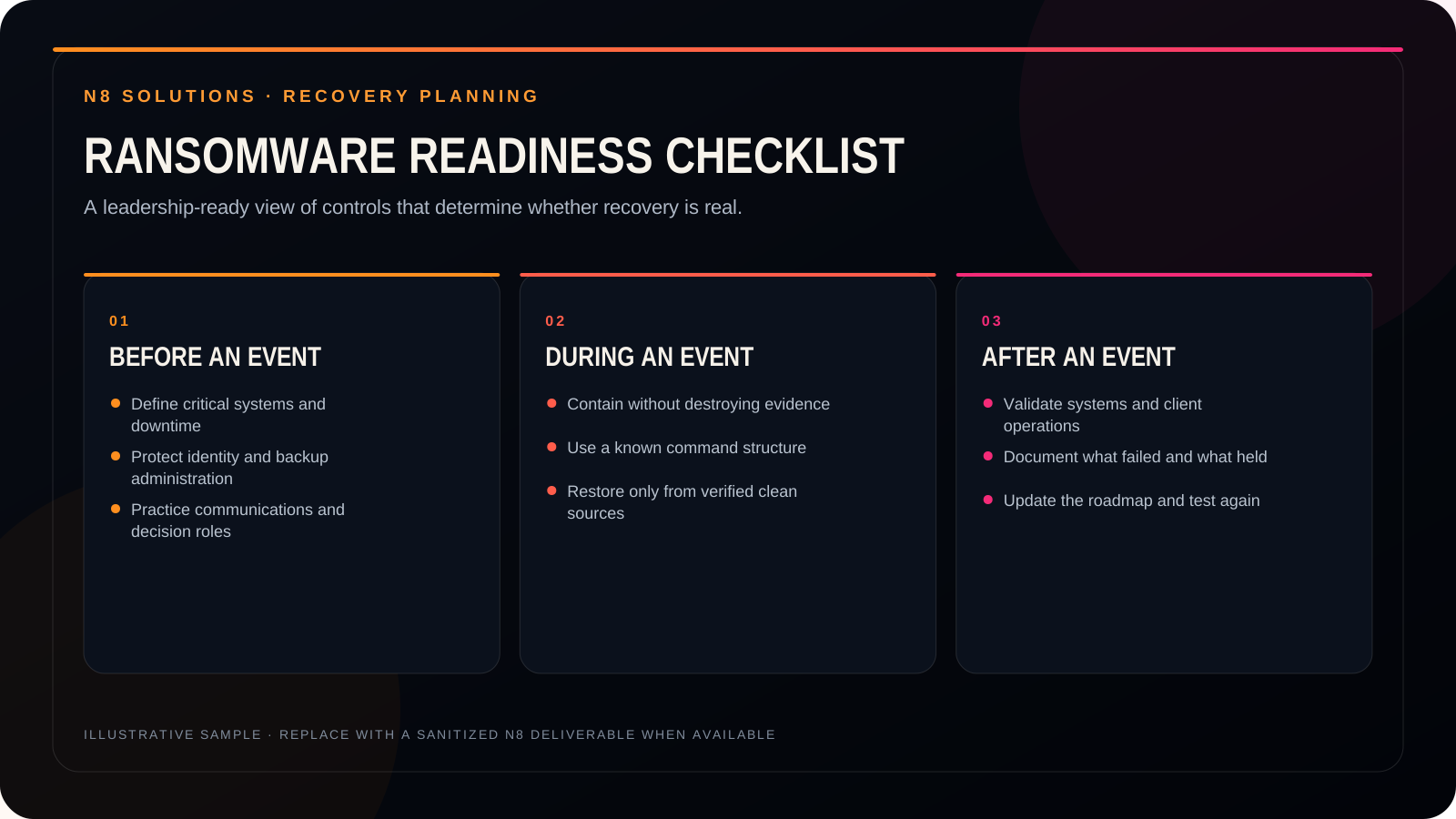
First 1 to 4 hours: contain and preserve
- Isolate affected systems and accounts.¹²
- Disable compromised credentials and enforce MFA resets as needed.¹²³
- Preserve logs and evidence before wiping systems.²⁵
Day 1: confirm scope and choose restore points
- Identify what was encrypted, what was accessed, and what was exfiltrated.¹²
- Validate clean restore points for Tier 1 systems.¹²⁵
- Confirm backup integrity and repository integrity before restoring at scale.⁵
Days 2 to 3: staged restoration and validation
- Restore identity and access dependencies first.³
- Restore case and document systems in priority order.⁵
- Validate with real workflows: login, search, open matters, produce documents, generate bills.⁵
Monitor for re-entry and ensure the root cause is addressed before resuming normal operations.¹²⁵
Evidence to keep (this improves recovery and reduces disputes)
Maintain a “recovery evidence folder” that includes:
- Backup configuration summary: targets, retention.¹³
- Monitoring reports: failures, alerts, and remediation actions.⁵⁶
- Restore test records: dates, scopes, outcomes, and validation steps.¹²⁵⁶
- Change control logs for backup policies and administrative access.⁵
This evidence is useful for leadership reporting, insurance discussions, and reducing uncertainty during crisis decision-making.²⁵
How N8 Solutions helps law firms protect backups from ransomware
N8 Solutions positions its backup and disaster approach around protecting the backups themselves, not just running backup jobs.⁷ N8 highlights:
- Backup Integrity Check: auditing backup systems for completeness, encryption, and recoverability.⁷
- Disaster recovery planning: designing and testing recovery strategies aimed at restoring operations quickly.⁷
N8 also offers cybersecurity and compliance services, including continuous monitoring and threat detection oriented to business continuity.⁷
For infrastructure resilience, N8 describes Cloud Hosting and Tier 3 Data Center services with redundancy and continuity concepts that can support recovery planning.⁸
If you want an objective view of whether your backups are ransomware-resistant, N8 invites firms to schedule a Free IT Assessment through its Backup and Disaster page.⁷
FAQs
How do we protect backups from ransomware?
Implement a single backup copy, and ensure the backup infrastructure and administrative credentials are isolated. Actively monitor for any changes or failures in the backups. Regularly run scheduled restore tests, keeping documented evidence of the results. This ensures your systems remain billable.
Why do attackers target backups?
Because backups are the fastest path to data recovery without paying. If attackers can delete or encrypt backups and the documentation needed to restore, they increase pressure to pay.¹²³
How often should a law firm test restores?
At minimum, test restores regularly for Tier 1 systems and after major changes.¹²⁵ The right cadence depends on your RPO/RTO, but it should be frequent enough that leadership can credibly say, “We have proven restores, not just scheduled backups.”⁵⁶
What should we restore first after ransomware?
Restore identity and access dependencies first, then the systems required to access matters and documents, then case management and operational workflows.³⁵ After that, restore billing, intake, and secondary systems.
What evidence should we keep to prove backups are recoverable?
Keep restore test records (date, scope, outcome), monitoring reports, and configuration evidence for retention.¹²⁵⁶
What backup solutions work best for law firms?
The best backup solutions for law firms combine offsite storage and automated monitoring. Your backup service should also provide isolated administrative access to protect against credential-based attacks.
Bibliography
- Cybersecurity and Infrastructure Security Agency (CISA). “#StopRansomware: Ransomware Guide.” Updated May 2023. Accessed January 10, 2026. https://www.cisa.gov/stopransomware/ransomware-guide
- Federal Bureau of Investigation (FBI). “Protecting Your Networks from Ransomware.” PDF. Accessed January 10, 2026. https://www.fbi.gov/file-repository/ransomware-prevention-and-response-for-cisos.pdf
- Microsoft Learn. “Prepare for ransomware attacks with a backup and recovery plan.” Last updated October 16, 2024. Accessed January 10, 2026. https://learn.microsoft.com/en-us/security/ransomware/protect-against-ransomware-phase1
- Microsoft Learn. “Azure backup and restore plan to protect against ransomware.” Last updated December 3, 2025. Accessed January 10, 2026. https://learn.microsoft.com/en-us/azure/security/fundamentals/backup-plan-to-protect-against-ransomware
- National Institute of Standards and Technology (NIST), National Cybersecurity Center of Excellence (NCCoE). “Protecting Data from Ransomware and Other Data Loss Events: A Guide for Managed Service Providers to Conduct, Maintain and Test Backup Files.” PDF. Accessed January 10, 2026. https://www.nccoe.nist.gov/sites/default/files/legacy-files/msp-protecting-data-extended.pdf
- NIST Cybersecurity Framework (CSF) 2.0 Reference (CSF Tools). “PR.DS-11: Backups of data are created, protected, maintained, and tested.” Accessed January 10, 2026. https://csf.tools/reference/nist-cybersecurity-framework/v2-0/pr/pr-ds/pr-ds-11/
- N8 Solutions. “Backup and Disaster.” Accessed January 10, 2026. https://www.n8its.com/backup-and-disaster/
- N8 Solutions. “Cloud Hosting & Tier 3 Data Center.” Published July 8, 2025. Accessed January 10, 2026. https://www.n8its.com/services/cloud-hosting-tier-3-data-center/
See what this means for your environment.
Bring the real situation. N8 will help separate the important risk from the noise and identify a practical next step.